Rock, Paper, Shotgun

A Lamentation for Alt-Tab
Posted by Alec Meer on May 12th, 2008 at 10:50 pm.

Share:

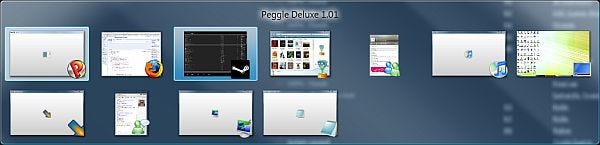
Faithful Peggle alt-tabs without complaint. Bless you, Peggle. Bleggle.

Today, a mini-rant, as befits my short stature and general foul temperament.

Or, at least, an open question. Why do so many PC games not support alt-tabbing out?

I can’t count the number of games I’ve had crash on me, or had a torturous five minute think before responding, or have turned everything black or white or technicolour, or have even hung the whole damn PC, just because I dared to press those two accursed keys. I honestly don’t understand why this isn’t one of the first things tested for – the very nature of the PC is a multi-tasking machine, designed for a myriad ways of communication, productivity and telling strangers on the internet that they suck – ideally all at once. To my mind, it’s like forgetting to include keyboard support.

I find games that won’t alt-tab particularly frustrating because I’ve got a dual monitor setup. I can see exactly what I need to get to waiting patiently on the other panel. It’s in reach, calling to me – but no, I daren’t risk it. Alright, striving for rationality, I’ll admit alt-tab isn’t as important as fixing a thousand fatal bugs or polishing the script to a perfect shine or building rock-solid netcode or whatever, but nevertheless, it’s something that’s absolutely fundamental to the nature of a Windows PC.

And it’s been a part of Windows since 1992. I mean, c’mon. Windows is undoubtedly a monster, but you can’t exactly claim ignorance, developers. MMOs, at least, get it, created with an understanding that their audience is one that lives online, that constantly feeds from a dozen different information-tentacles and absolutely must be able to task-switch in the blink of an eye. Damningly, even bloody Xbox 360s can do it now, or at least their squashed mini-menu equivalent (more an overlay than actual task-switching, really – Valve does something similar with its Steam Community shift-tabbing).

Even the Source engine, by now a remarkably mature piece of code, often won’t play nice – I’d planned to be writing up an interesting HL2 mod tonight, but instead I’m staring at a frozen Loading screen on the other monitor because I didn’t manage to stop the reflex action of reaching for The Unholy Buttons when I heard an instant message arrive. (I’ll admit that during a loading screen was a particularly stupid time for me to have attempted an alt-tab, but the waiting time had gotten painful). I’ve taken to running Team Fortress 2 in a window – it brutalises the framerate, but sweet merciful Jeebus, at least that way I can alt-tab without disaster.

Please, developers, won’t you think of the children? The poor, alt-tabbing children…

And don’t even get me started on games that drop to desktop if you accidentally hit the Windows flag key.

/Rant.

(Oh, if any devs fancy chiming in on why alt-tab gets overlooked/is nightmarish to incorporate/whatever, I’d genuinely be interested to hear. I’m not that blinded by rage, honest.)

__________________


Related Stories:

__________________

« Alone In The Dark: “Cinematic” Trailer | And My Axe! »

, , .

79 Comments »

  1. Forceflow says:

    It’s mostly an issue of swapping out game content to disk, that takes time.

  2. Rook says:

    Alt-Tab is for loosers, it’s all about Win-Tab

  3. skillian says:

    Doesn’t Games for Windows require alt-tab support? Not that I’m a big fan of GfW, but that’s one useful standardisation.

    I would have agreed with this piece a few years ago, but it seems to me that alt-tab is being supported more and more these days.

  4. Frymaster says:

    Forceflow: “It’s mostly an issue of swapping out game content to disk, that takes time”

    Not really, because the issue is with video memory. It doesn’t need to write the contents of that to disk, because it already exists in the resource files of the game. It’s loading them back up from the resource files that’s the problem.

    Source games do this, but their implementation is… incomplete. The best implementation of this I’ve seen was in Rome:Total War. You alt-tabbed back in and got a nice little progress bar in the middle of the screen as it reloaded all the resources. With source games, not only do you not get this, but after you click/alt-tab on the game, it stays at the desktop until loading is complete. That means if you use any mouse button or key at ALL – including clicking again on the game – then once it’s loaded everything, it will immediately minimize the game again. It’s quite easy to get stuck in game-loading ping-pong that way.

  5. Crispy says:

    skillian:
    I haven’t done much GfW testing so I’m not sure. My gut feeling is that it is a GfW standard, along with Alt Enter, but only if the game supports windowed mode. Not 100% sure though.

    Alec:
    I’m guessing the Source mod you’re talking about is the new Portal mappack mod that’s just been released?

  6. AbyssUK says:

    Please just make games for Linux and openGl and ignore windows and directx… then maybe it’ll go away. Also then maybe you can spin your game about while on the 3d desktop cube of love.

  7. itsallcrap says:

    ALT-TAB works fine for me in TF2 under Vista, albeit a little slowly.

    I can’t spin my games about on the Linux desktop cube of love, though :(

    Is there something I need to set in compiz, or were you just talking about some hypothetical utopian gaming future?

    I don’t think there’s any hope of Windows going away, but if developers just stuck to OpenGL instead of DirectX, then porting between Windows and Linux or OS/X would be a far easier task.

    And to add insult to buggery OGL is actually the easier of the two to write in.

    I guess there must be some reason they keep using DX…. *shrug*

  8. Pod says:

    World in conflict kinda detects alt-tab. When you come back to it has a black screen that says “Hold on, we’re reloading your stuff”, and it’s pretty fast, even on my ancient machine.

    @Frymaster: Forceflow is possibly talking about RAM swapping out to disk? A lot of people certainly get “bitten” by this. Infact, my £50 ancient computer can alt-tab in and out of TF2 a lot quicker than £2000 beasts because I took the time to set up the swap file space on different physical disks from my games and torrents and so on.

  9. phuzz says:

    I used to find on my old system with 1Gb of ram that alt-tabbing back to the desktop out of HL2 would take a good couple of minutes, and would crash maybe 5% of the time.
    After a while I added an extra Gb of RAM. Suddenly I could flip out of HL2 within just a few (tens of) seconds, and the crashing pretty much went away.

    Now I have 4Gb of ram (for £60, oh, and 64bit to make use of it) so life is sweet.

    short version, more ram makes windows happy :)

  10. Ginger Yellow says:

    I thought GfW required alt-tabability too, but I’ve got plenty of GfW games that don’t play nice.

  11. The Shed says:

    Cheers again for making it make sense, cliffski.

    Every time I log on to play a Steam game with a friend these days, it doesn’t open properly, and I have to Alt Tab to get it to fill the screen. Then it might decide to crash out, or I might need to minimise it anyway, and it just crashes and provides me witha lovely black screen for at least a few minutes. Pretty much don’t play those games anymore.

    RAM is the most important thing, for me at least. I’m still dealing with 512MB on the desktop machine (laptop with 1GB here), and it is seriously detrimental to the running and smoothness of everything. 512 is just no good anymore. Wish I was in your shoes, phuzz.

  12. VFIG says:

    @Cargo Cult: “Sodding fantastic when you’re editing materials and textures, and you’re previewing them in-game, without restarting” — How do you get Source to reload materials without restarting? I’d kill for that. At the moment I’m constantly restarting tf2 just so it reloads the materials in the map I’m working on.

  13. Cargo Cult says:

    VFIG: With cheats enabled, ‘mat_reloadallmaterials’ to get it to reload everything – takes a couple of seconds on my machine. There’s a more specific command to reload just a single material, but I can’t remember it right now. Typing just ‘mat_reload’ at the console will probably bring up the completion-list thingy with all the other relevant commands, anyway…

  14. brog says:

    A possibly related issue: PRINT SCREEN. Any idea what it is that prevents this just taking a screenshot?

  15. Derek K. says:

    @ozzie:
    “Yeah, Psychonauts is really the only game that had proper support for alt-tab.”

    NWN2 does as well – it autopauses when you alt+tab out, and auto restarts when you come back.

    @Article:

    NO MOTHER F’IN KIDDING.

    I am long past the days of playing a game for 4 hours straight, the rest of the world be damned. I have things going on. IMs. Skype calls. Hell, sometimes I want to look something up on the ‘net, whether it be the relative impacts of the three dialogue choices, the *actual* meaning of what the game just told me (RPGs in particular do this. “This ability will make you cooler.” Great. Just great. What does that *mean*?), etc. My games not supporting that is nearly inconceivable….

  16. nakke says:

    Slightly related. Why can’t multimonitor support make more sense? Why does the game on the primary need to be minimized when I switch to an application on the other screen? It’s kind of silly to just have a video presentation of what’s happening on your other screen and not be able to interact with it without all hell breaking loose on the first screen, if a full-screen application is running on it. Now luckily at least some media players manage to keep the full screen video running.

  17. eyemessiah says:

    I care more about alt F4.

    Me: “Ok game I’m done with you now.”
    (Alt F4)


    Me: “What do you mean ‘no’?”

  18. VFIG says:

    @Cargo Cult: Thanks!

  19. Robyrt says:

    On dual-monitor support: The only example I can think of is Supreme Commander, which puts the minimap on your second monitor. Ironically, this is also the RTS that least requires a minimap.

  20. zima says:

    I’d love to see more games that support dual-monitor in the way Supreme Commander does…

    I’d especially wish for Diablo2 to have it…(I don’t know, perhaps it’s just peculiarities of my visual cortex, but I can barelly make out anything in the way D2 automap is currently implemented (and minimap is too small))

  21. malkav11 says:

    I wouldn’t be surprised if Games for Windows had alt-tab support as a standard and people simply ignored it and got approved for the GfW logo anyway. There’s other requirements that seem to get handwaved away.

  22. KidJ says:

    I haven’t read all of the posts here as there are so many, but felt I should add something as I have written code to support alt-tab in commercial games, and its not the trivial functionality that most people think it is.

    As cliffski mentioned way up top, your Direct3d “device” (read graphics card) is no longer accessable by your application when you alt-tab away in fullscreen mode. This means that any resources which are resident in graphics card local memory are lost, and you must re-create these when you alt-tab back in. Some games use a fair amount of these graphics card local resources, and they can be things like environment maps, which require some time to re-create, so this is why it can take a while to get back into the game. For the most part, Direct3d has your back, as any resources which are allocated in cpu-side memory remain untouched for you when someone alt-tabs away. Direct3d even does enough work internally so that if your application tries to access a graphics card local resource when you have lost your device, it will return you a dummy resource (allocated in system memory), so in some parts of your codebase you don’t have to worry about the fact that you have lost your device at all.

    To anyone technical reading this – please don’t flame me for glossing over details here, I just wanted to explain a bit why alt-tab isn’t the easiest thing in the world. Having said that, I still agree that all games should support it in the vast majority of situations, as its not a HUGE amount of work, and if you plan for it from the start of your game then its not hard at all. Problem is that a lot of devlopers try to add support for it at a late stage in the development process (its not very fun code to write and doesn’t help to sell your game a whole lot) and this can produce bugs.

  23. wikibuddha says:

    Ya, well, I want ALT+SHIFT+TAB support!

  24. Crispy says:

    @malkav11:
    You’re right. I’ve seen games pass as GfW even thought they don’t have menu mouse support, which is pretty much an unwritten law ever since the tail end of Windows 3.1!

  25. P Dante says:

    Just echoing BrokenSymmetry actually… I ctrl+f’d the comments for Guild Wars because I knew someone else would have mentioned it’s alt+tabbing, simply because it was utterly perfect. Why the fuck others can’t get it right is beyond me. It’s little things like that that scream quality.

  26. Alarik says:

    Hmm, I am Alt+Tabbing and haven’t noticed any serious issues lately… Maybe I am just lucky though… From the recent games, I am recalling for example The Witcher – tabbing in and out without any problems. I am running XP with only 2 GB of RAM, single core CPU.

  27. Jon says:

    Blizzard games all support perfect ALT Tabbing, in Warcraft 3 you can even do this within the loading screens of most games, they all recover perfectly, how hard can it be for other developers?

  28. Jake says:

    For those of you having problems alt-tabbing out of Steam games, try disabling the in-game community overlay (file>settings>in-game). It fixed the alt-tabbing problem for Mount and Blade, it might work for other games too.

  29. Adam says:

    To solve this in source, put this in the launch parameters:
    -windowed -noborder
    Your resolution must be the same as your desktop.
    The framerates are fine, it looks just like it did unwindowed, and you can flick between things with ease.

Page 2 of 2«12

XHTML: You can use these tags: <a href="" title=""> <abbr title=""> <acronym title=""> <b> <blockquote cite=""> <cite> <code> <del datetime=""> <em> <i> <q cite=""> <strike> <strong>

GamersGate has loads of PC games.

Respond to our gibber

Browse the archive

Buy classic PC games from Good Old Games, please.